From Zero to One, Create Your First Product Webpage with Tuanjie AI
Create Project
Create a new blank project webapp and open it with your preferred editor (this article uses VS Code as a demonstration).
Install Tuanjie AI Plugin and Complete Login
Please refer to the Quick Start section of the Tuanjie AI official documentation to complete plugin installation, activation, and account login operations, ensuring the plugin can properly call its functions.
Design Your Webpage
No designer? No problem. You can draw inspiration from excellent product designs. This article selects the Continue official website as a reference example.
We have captured two images from the official homepage (as shown below). Next, we'll use these two images as input, leveraging Tuanjie AI's multimodal capabilities to automatically identify the elements, styles, and layout structure in the images.
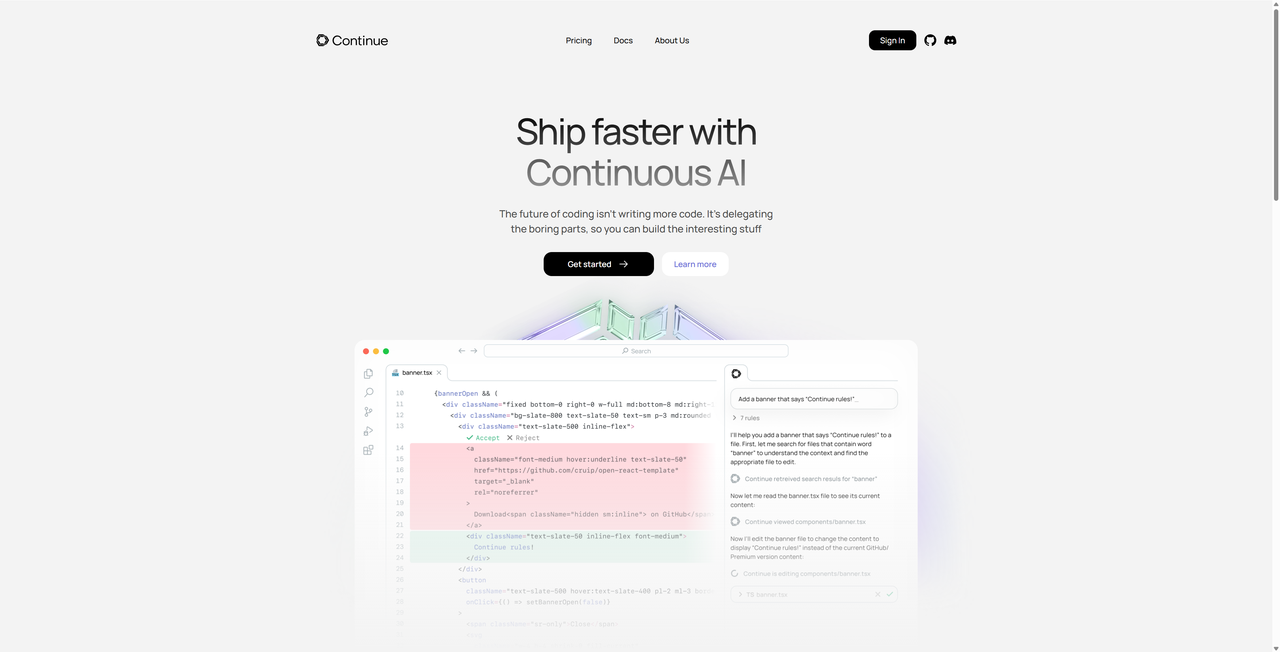
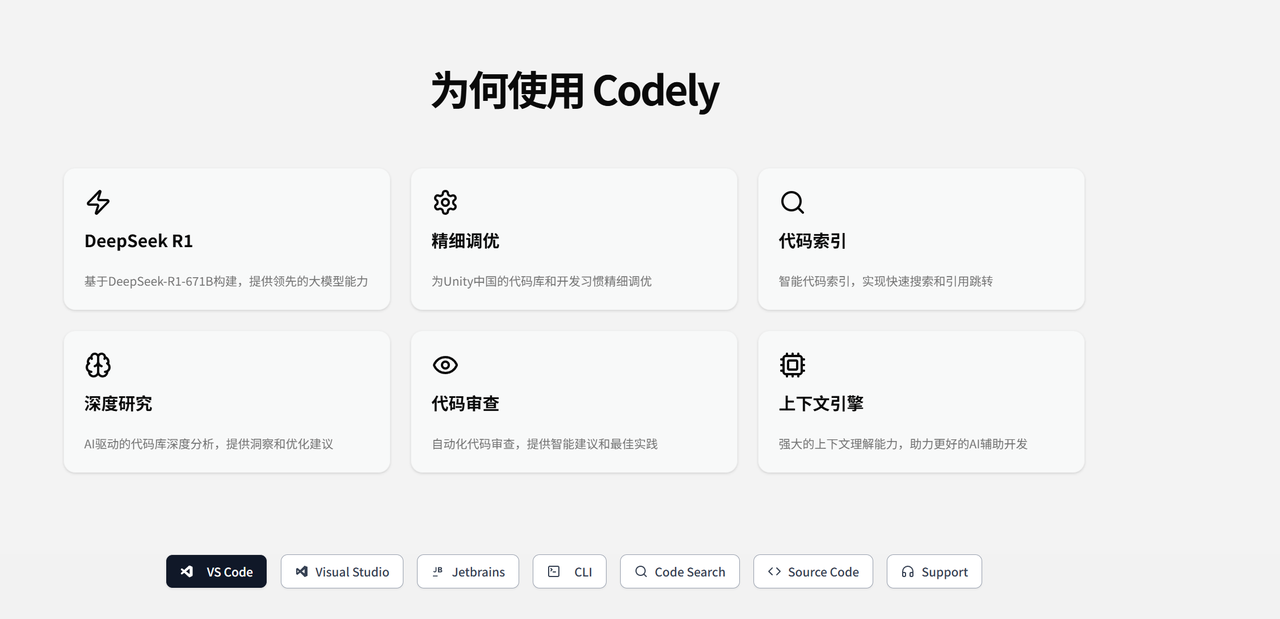
Create Your Webpage with Tuanjie AI in One Click
Based on the two reference images above, we will let Tuanjie AI help us complete the entire webpage creation. The specific operations are as follows:
Place Reference Images
Put the two reference images in the root directory of the webapp project.
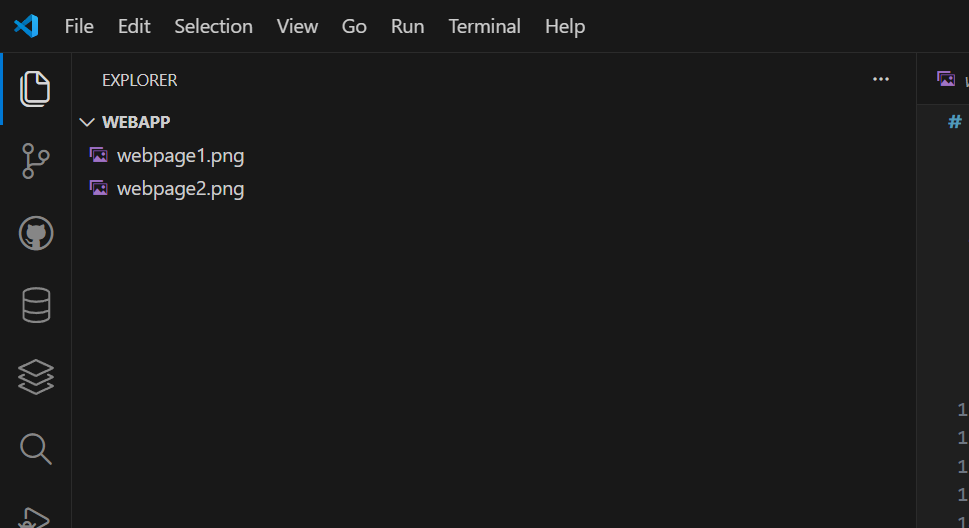
Enter Creation Prompt in Tuanjie AI Input Box
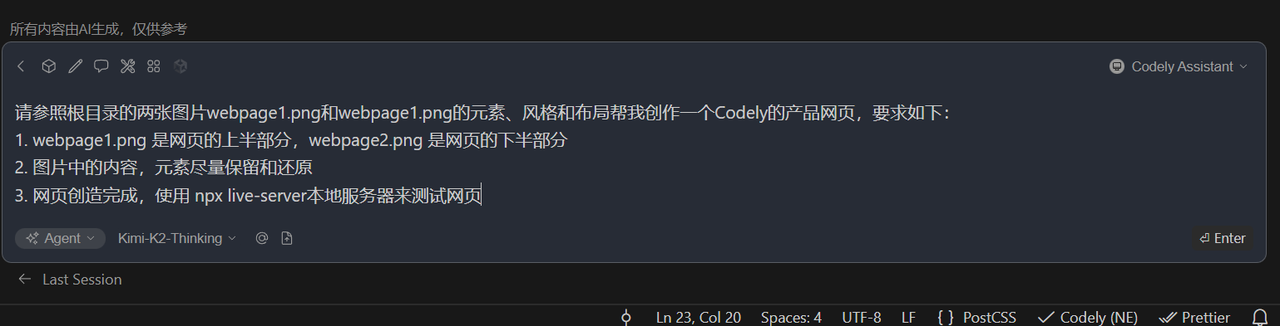
Copy the following prompt and paste it into the Tuanjie AI input box to ensure the instructions clearly convey your creation requirements:
Please refer to the two images webpage1.png and webpage1.png in the root directory for their elements, style, and layout to help me create a Tuanjie AI product webpage with the following requirements:
1. webpage1.png is the upper part of the webpage, webpage2.png is the lower part of the webpage
2. Try to preserve and restore the content and elements in the images as much as possible
3. After the webpage is created, use npx live-server local server to test the webpage
View Tuanjie AI's Creation Results
After submitting the prompt, wait for Tuanjie AI to complete the webpage creation, and view the generation process and final results in real time.
Tuanjie AI Creation Workflow
After receiving the instruction, Tuanjie AI will automatically break down the webpage creation task into the following steps and execute them one by one:
- Parse the interface elements, design style, and page layout of the two reference images
- Create HTML file to build the overall structure framework of the webpage
- Generate CSS style file to accurately restore the visual style of the reference images
- Call live-server to start local service and complete webpage effect testing
Access and View Webpage Source Code
After creation is complete, you can find the automatically generated webpage source code files in the project directory. You can directly open them to view the code content, or let Tuanjie AI make secondary modifications based on your new requirements.
Below is an example of the source code files generated by the local Demo:
index.html
<!DOCTYPE html>
<html lang="en">
<head>
    <meta charset="UTF-8">
    <meta name="viewport" content="width=device-width, initial-scale=1.0">
    <title>Tuanjie AI - Intelligent Programming Assistant</title>
    <link rel="stylesheet" href="styles.css">
</head>
<body>
    <!-- Navigation bar - webpage1.png -->
    <header class="header">
        <div class="nav-container">
            <div class="logo">
                <div class="logo-icon">⬢</div>
                <span class="logo-text">Continue</span>
            </div>
            <nav class="nav-menu">
                <a href="#pricing">Pricing</a>
                <a href="#docs">Docs</a>
                <a href="#about">About Us</a>
            </nav>
            <div class="nav-actions">
                <button class="signin-btn">Sign In</button>
                <div class="social-icons">
                    <a href="#" class="social-icon">🐙</a>
                    <a href="#" class="social-icon">😊</a>
                </div>
            </div>
        </div>
    </header>

    <!-- Hero section - webpage1.png -->
    <section class="hero">
        <div class="hero-content">
            <h1 class="hero-title">
                <span class="title-part1">Ship faster with</span>
                <span class="title-part2">Continuous AI</span>
            </h1>
            <p class="hero-subtitle">
                The future of coding isn't writing more code. It's delegating the boring parts, so you can build the interesting stuff
            </p>
            <div class="hero-buttons">
                <button class="btn btn-primary">
                    Get started
                    <span class="arrow">→</span>
                </button>
                <button class="btn btn-secondary">Learn more</button>
            </div>
            <div class="hero-image">
                <div class="code-editor-mock">
                    <div class="editor-header">
                        <div class="window-controls">
                            <span class="dot red"></span>
                            <span class="dot yellow"></span>
                            <span class="dot green"></span>
                        </div>
                        <div class="editor-tabs">
                            <span class="tab active">main.py</span>
                            <span class="tab">utils.py</span>
                        </div>
                    </div>
                    <div class="editor-content">
                        <div class="line-numbers">
                            <span>1</span>
                            <span>2</span>
                            <span>3</span>
                            <span>4</span>
                            <span>5</span>
                            <span>6</span>
                            <span>7</span>
                            <span>8</span>
                        </div>
                        <div class="code-content">
                            <div class="code-line">
                                <span class="keyword">def</span> <span class="function">calculate_total</span>(items):
                            </div>
                            <div class="code-line">
                                <span class="indent">    </span><span class="comment"># Calculate the total price</span>
                            </div>
                            <div class="code-line">
                                <span class="indent">    </span><span class="keyword">return</span> <span class="function">sum</span>(item.price <span class="keyword">for</span> item <span class="keyword">in</span> items)
                            </div>
                            <div class="code-line"></div>
                            <div class="code-line">
                                <span class="comment"># AI suggestion appears here</span>
                            </div>
                            <div class="code-line">
                                <span class="ai-suggestion">💡 Suggest optimization for large lists</span>
                            </div>
                            <div class="code-line">
                                <span class="keyword">def</span> <span class="function">optimized_total</span>(items):
                            </div>
                            <div class="code-line">
                                <span class="indent">    </span><span class="keyword">return</span> <span class="function">sum</span>(items, key=<span class="keyword">lambda</span> x: x.price)
                            </div>
                        </div>
                    </div>
                </div>
            </div>
        </div>
    </section>

    <!-- Feature cards section - webpage2.png -->
    <section class="features-section">
        <h2 class="section-title">Why Use Tuanjie AI</h2>
        <div class="features-grid">
            <div class="feature-card">
                <div class="feature-icon">⚡</div>
                <h3 class="feature-title">DeepSeek R1</h3>
                <p class="feature-description">Integrated DeepSeek R1 model, providing smarter code suggestions and optimization solutions</p>
            </div>
            <div class="feature-card">
                <div class="feature-icon">⚙️</div>
                <h3 class="feature-title">Fine Tuning</h3>
                <p class="feature-description">Personalized adjustments for your codebase, providing more precise suggestions</p>
            </div>
            <div class="feature-card">
                <div class="feature-icon">🔍</div>
                <h3 class="feature-title">Code Indexing</h3>
                <p class="feature-description">Quickly index the entire project's code, providing code analysis from a global perspective</p>
            </div>
            <div class="feature-card">
                <div class="feature-icon">🧠</div>
                <h3 class="feature-title">Deep Research</h3>
                <p class="feature-description">Deeply understand code logic, providing architecture-level optimization suggestions</p>
            </div>
            <div class="feature-card">
                <div class="feature-icon">👁️</div>
                <h3 class="feature-title">Code Review</h3>
                <p class="feature-description">Intelligent code review, discovering potential issues and providing improvement suggestions</p>
            </div>
            <div class="feature-card">
                <div class="feature-icon">🔬</div>
                <h3 class="feature-title">Context Engine</h3>
                <p class="feature-description">Understand code context, providing suggestions that match project style</p>
            </div>
        </div>
    </section>

    <!-- Tool integration badges - webpage2.png -->
    <section class="integrations-section">
        <div class="integrations-container">
            <div class="integration-badge active">
                <span class="badge-icon">🆚</span>
                <span class="badge-text">VS Code</span>
            </div>
            <div class="integration-badge">
                <span class="badge-icon">🅱️</span>
                <span class="badge-text">Visual Studio</span>
            </div>
            <div class="integration-badge">
                <span class="badge-icon">🗄️</span>
                <span class="badge-text">JetBrains</span>
            </div>
            <div class="integration-badge">
                <span class="badge-icon">🐍</span>
                <span class="badge-text">Python</span>
            </div>
            <div class="integration-badge">
                <span class="badge-icon">☕</span>
                <span class="badge-text">Java</span>
            </div>
            <div class="integration-badge">
                <span class="badge-icon">🟨</span>
                <span class="badge-text">JavaScript</span>
            </div>
            <div class="integration-badge">
                <span class="badge-icon">📦</span>
                <span class="badge-text">More Tools</span>
            </div>
        </div>
    </section>
</body>
</html>
styles.css
* {
    margin: 0;
    padding: 0;
    box-sizing: border-box;
}

body {
    font-family: -apple-system, BlinkMacSystemFont, 'Segoe UI', Roboto, 'Helvetica Neue', Arial, sans-serif;
    background-color: #f8f8f8;
    color: #333;
    line-height: 1.6;
}

/* Navigation bar styles - webpage1.png */
.header {
    background-color: #fff;
    padding: 20px 0;
    box-shadow: 0 2px 10px rgba(0, 0, 0, 0.05);
}

.nav-container {
    max-width: 1200px;
    margin: 0 auto;
    display: flex;
    align-items: center;
    justify-content: space-between;
    padding: 0 40px;
}

.logo {
    display: flex;
    align-items: center;
    gap: 8px;
}

.logo-icon {
    width: 24px;
    height: 24px;
    background-color: #000;
    clip-path: polygon(50% 0%, 100% 25%, 100% 75%, 50% 100%, 0% 75%, 0% 25%);
    display: flex;
    align-items: center;
    justify-content: center;
    color: #fff;
    font-size: 10px;
}

.logo-text {
    font-size: 18px;
    font-weight: bold;
    color: #000;
}

.nav-menu {
    display: flex;
    gap: 40px;
}

.nav-menu a {
    text-decoration: none;
    color: #333;
    font-size: 14px;
    transition: color 0.3s;
}

.nav-menu a:hover {
    color: #000;
}

.nav-actions {
    display: flex;
    align-items: center;
    gap: 15px;
}

.signin-btn {
    background-color: #000;
    color: #fff;
    border: none;
    padding: 10px 20px;
    border-radius: 8px;
    font-size: 14px;
    font-weight: 500;
    cursor: pointer;
    transition: background-color 0.3s;
}

.signin-btn:hover {
    background-color: #333;
}

.social-icons {
    display: flex;
    gap: 10px;
}

.social-icon {
    text-decoration: none;
    font-size: 18px;
    color: #333;
    transition: color 0.3s;
}

.social-icon:hover {
    color: #000;
}

/* Hero section styles - webpage1.png */
.hero {
    padding: 80px 40px;
    text-align: center;
    background-color: #f8f8f8;
}

.hero-content {
    max-width: 800px;
    margin: 0 auto;
}

.hero-title {
    font-size: 56px;
    font-weight: bold;
    margin-bottom: 20px;
    line-height: 1.2;
}

.title-part1 {
    color: #333;
}

.title-part2 {
    color: #666;
}

.hero-subtitle {
    font-size: 20px;
    color: #666;
    margin-bottom: 40px;
    max-width: 600px;
    margin-left: auto;
    margin-right: auto;
}

.hero-buttons {
    display: flex;
    gap: 15px;
    justify-content: center;
    margin-bottom: 60px;
}

.btn {
    padding: 14px 28px;
    border-radius: 10px;
    font-size: 16px;
    font-weight: 500;
    cursor: pointer;
    transition: all 0.3s;
    text-decoration: none;
    display: inline-flex;
    align-items: center;
    gap: 8px;
}

.btn-primary {
    background-color: #000;
    color: #fff;
    border: none;
}

.btn-primary:hover {
    background-color: #333;
    transform: translateY(-2px);
}

.btn-secondary {
    background-color: #fff;
    color: #666;
    border: 1px solid #e0e0e0;
}

.btn-secondary:hover {
    background-color: #f5f5f5;
    border-color: #ccc;
}

.arrow {
    font-size: 18px;
}

/* Code editor mock - webpage1.png */
.hero-image {
    max-width: 800px;
    margin: 0 auto;
}

.code-editor-mock {
    background-color: #1e1e1e;
    border-radius: 12px;
    overflow: hidden;
    box-shadow: 0 20px 40px rgba(0, 0, 0, 0.3);
}

.editor-header {
    background-color: #2d2d2d;
    padding: 12px 20px;
    display: flex;
    align-items: center;
    gap: 20px;
}

.window-controls {
    display: flex;
    gap: 8px;
}

.dot {
    width: 12px;
    height: 12px;
    border-radius: 50%;
}

.dot.red { background-color: #ff5f56; }
.dot.yellow { background-color: #ffbd2e; }
.dot.green { background-color: #27ca3f; }

.editor-tabs {
    display: flex;
    gap: 10px;
}

.tab {
    color: #969696;
    font-size: 13px;
    padding: 4px 8px;
    border-radius: 4px;
}

.tab.active {
    background-color: #1e1e1e;
    color: #fff;
}

.editor-content {
    display: flex;
    font-family: 'Consolas', 'Monaco', 'Courier New', monospace;
    font-size: 14px;
    padding: 20px 0;
}

.line-numbers {
    color: #858585;
    padding: 0 20px;
    text-align: right;
    user-select: none;
}

.line-numbers span {
    display: block;
    line-height: 1.6;
}

.code-content {
    flex: 1;
    color: #d4d4d4;
}

.code-line {
    line-height: 1.6;
}

.keyword { color: #569cd6; }
.function { color: #dcdcaa; }
.comment { color: #6a9955; }
.indent { color: transparent; }
.ai-suggestion {
    color: #f0e68c;
    font-style: italic;
}

/* Feature cards section styles - webpage2.png */
.features-section {
    padding: 80px 40px;
    background-color: #f8f8f8;
}

.section-title {
    text-align: center;
    font-size: 36px;
    font-weight: bold;
    color: #000;
    margin-bottom: 60px;
}

.features-grid {
    max-width: 1200px;
    margin: 0 auto;
    display: grid;
    grid-template-columns: repeat(auto-fit, minmax(350px, 1fr));
    gap: 30px;
    padding: 0 20px;
}

.feature-card {
    background-color: #fff;
    border-radius: 12px;
    padding: 30px;
    box-shadow: 0 4px 12px rgba(0, 0, 0, 0.05);
    transition: transform 0.3s, box-shadow 0.3s;
    border: 1px solid #f0f0f0;
}

.feature-card:hover {
    transform: translateY(-5px);
    box-shadow: 0 8px 24px rgba(0, 0, 0, 0.1);
}

.feature-icon {
    width: 48px;
    height: 48px;
    background-color: #f5f5f5;
    border-radius: 12px;
    display: flex;
    align-items: center;
    justify-content: center;
    font-size: 24px;
    margin-bottom: 20px;
}

.feature-title {
    font-size: 20px;
    font-weight: bold;
    color: #000;
    margin-bottom: 12px;
}

.feature-description {
    font-size: 15px;
    color: #666;
    line-height: 1.6;
}

/* Tool integration badges styles - webpage2.png */
.integrations-section {
    padding: 40px 0 80px 0;
    background-color: #f8f8f8;
}

.integrations-container {
    max-width: 1200px;
    margin: 0 auto;
    display: flex;
    justify-content: center;
    flex-wrap: wrap;
    gap: 15px;
    padding: 0 40px;
}

.integration-badge {
    background-color: #fff;
    border: 1px solid #e0e0e0;
    border-radius: 20px;
    padding: 8px 16px;
    display: flex;
    align-items: center;
    gap: 8px;
    transition: all 0.3s;
    cursor: pointer;
}

.integration-badge:hover {
    background-color: #f5f5f5;
    border-color: #ccc;
}

.integration-badge.active {
    background-color: #000;
    border-color: #000;
    color: #fff;
}

.badge-icon {
    font-size: 16px;
}

.badge-text {
    font-size: 14px;
    font-weight: 500;
}

/* Responsive design */
@media (max-width: 768px) {
    .nav-container {
        flex-direction: column;
        gap: 20px;
    }

    .nav-menu {
        gap: 20px;
    }

    .hero-title {
        font-size: 36px;
    }

    .hero-subtitle {
        font-size: 16px;
    }

    .hero-buttons {
        flex-direction: column;
        align-items: center;
    }

    .features-grid {
        grid-template-columns: 1fr;
        padding: 0;
    }

    .integrations-container {
        justify-content: flex-start;
        overflow-x: auto;
        flex-wrap: nowrap;
        padding: 0 20px;
    }
}

@media (max-width: 480px) {
    .hero {
        padding: 60px 20px;
    }

    .nav-container {
        padding: 0 20px;
    }

    .feature-card {
        padding: 20px;
    }
}