Tuanjie AI Helps You Quickly Master Unfamiliar Projects
Many developers successfully land jobs at large tech companies by memorizing interview "interview prep scripts", only to find themselves at a loss when facing large projects or unfamiliar languages. The root cause is a lack of practical methods for efficiently reading and understanding code. This document will detail in depth how Tuanjie AI can help developers quickly analyze unfamiliar project code and efficiently get started with new projects. Using Meta's open source Glean repository as a practical example, we will take you through an immersive experience of Tuanjie AI's core functionality.
1. Preparations: Download Repository and Configure Environment
Clone Repository Locally
Use the Git command to clone the Glean repository to your local disk for subsequent analysis through Tuanjie AI:
git clone git@github.com:facebookincubator/Glean.git
After cloning, open the repository with your preferred editor (this article uses VS Code as an example).
Install Tuanjie AI Plugin and Complete Login
Please refer to the Installation and Login section of the Tuanjie AI official documentation to complete plugin installation, activation, and account login operations, ensuring the plugin can properly call its functions.
2. Project Initialization: Generate Comprehensive Project Summary
Tuanjie AI provides a one-click project summary generation feature that can quickly organize core project information, laying the foundation for subsequent code analysis.
Operation Steps
Click the "Quick Start - Generate Project Summary" button in the Tuanjie AI plugin panel in VS Code. The plugin will automatically scan the project directory, analyze key information such as project structure, build method, development language, and core frameworks, and generate a customized context file Codely.md.
This file not only simplifies the process of submitting project-specific commands to Tuanjie AI agents, but also allows the AI model to more deeply understand the project background. Below is the core content of the Codely.md generated for Glean:
# Glean - Code Understanding and Analysis System

## Project Overview

Glean is a system for collecting, deriving, and working with facts about source code. It's designed to efficiently store and query information about code structure at scale, powering tools from online IDE features to offline code analysis.

**Key Capabilities:**
- Collect and store detailed information about code structure
- Query code information to power development tools and analysis
- Support multiple programming languages through various indexers
- Provide language-agnostic symbol services via Glass

**Status:** Pre-release software from Meta (Facebook)

## Architecture Overview

### Core Components

```
                +----------+
                |          |
                |   lib    | Schema-specific libraries
                |          |
                +-----+----+
                      |
                +-----v----+
                |          |
                |  schema  | Generated schema support code
                |          |
                +-----+----+
                      |
                      |
                      |
                      |
                +-----v-----+                   +-----------------+
                |           | remote            |                 | Access
                | client/hs | client API        | client/hs/local | local DBs
                |           |                   |                 |
  +------+      +-----+-----+                   +--------+--------+
  |      |            |                                  |
  |  if  |            |                                  |
  |      |       +----v---+                         +----v---+
  +------+<------|        |                         |        |
                `|   hs   <--------------------------   db   |`
  +------+<------|        |                         |        |
  |      |       +----+---+                         +----|---+
  | util |            |                                  |
  |      |            |                                 |
  +------+            |                                  |
                      |                                  |         Haskell
            ----------+----------------------------------+-----------------
                      |                                  |           C++
                      |                                  |
                 +----v----+                        +----v----+
                 |         |                        |         |
               `|   rts   <------------------------+ rocksdb |`
                 |         |                        |         |
                 +---------+                        +---------+
```

### Directory Structure

- **rts/** - Glean Runtime System (C++)
  - Fact storage, serialization, ownership
  - Bytecode and query evaluation
  - Write cache

- **cpp/** - C++ API for Glean RTS (used by Clang indexer)

- **util/** - Haskell utilities (`Glean.Util.*`)

- **bytecode/** - Bytecode definitions and code generation

- **if/** - Thrift interface files

- **hs/** - Low-level Haskell layer
  - Angle language parser and types
  - Schema handling
  - Haskell API to RTS functionality
  - Bytecode generation

- **db/** - Database management and query engine
  - Database management (`Glean.Database.*`)
  - Query engine (`Glean.Query.*`)
  - Write processing (`Glean.Write.*`)
  - Generic Glean backend

- **rocksdb/** - C++ RocksDB storage layer

- **client/** - Client APIs for various languages

- **server/** - Glean server implementation

- **glass/** - Glass service (language-agnostic symbol server)
  - Provides IDE-like features: go-to-definition, find-references, symbol search
  - LSP-like API on top of Glean

- **index/** - Framework for specifying indexers

- **schema/** - Schema definitions and generated code

- **lang/** - Language-specific indexers

- **tools/** - CLI tools and utilities

- **test/** - Test suites and regression tests

## Language Support

### Fully Supported Languages
- **C++ and C** - via dedicated indexer
- **Hack** - via dedicated indexer
- **Haskell** - via dedicated indexer
- **JavaScript/Flow** - via dedicated indexer

### Via SCIP/LSIF Formats
- Rust (via rust-analyzer)
- Go
- TypeScript
- Java
- Python
- Dotnet

### Future Support (not in open source yet)
- Python (native indexer)
- Java (native indexer)
- Kotlin, Erlang, Thrift, Buck, Bazel, C#

## Build System

Glean uses a hybrid build system combining Cabal (Haskell) and Make (C++):

### Build Commands

```bash
# Build everything
make

# Build with development mode (faster, unoptimized)
make MODE=dev

# Build with optimized mode
make MODE=opt

# Run tests
make test

# Build specific components
make glean  # Builds glean, glean-server, glean-hyperlink
```

### Build Modes

- **Default mode**: Standard Cabal build
- **dev mode**: Fast, unoptimized builds for development
- **opt mode**: Slow, optimized builds for benchmarking

### C++ Library Building

C++ libraries can be built two ways:
- **Via Make** (default for development): Parallel compilation, automatic dependency tracking
- **Via Cabal**: Required for Hackage compatibility

### Build Configuration

The build system uses `glean.cabal.in` as a template, processed with m4 macros to generate `glean.cabal` based on build mode.

## Development Workflow

### Prerequisites

- GHC (Glasgow Haskell Compiler)
- Cabal 3.6+
- C++ compiler (Clang or GCC)
- RocksDB
- Thrift compiler

### Setting Up Development Environment

1. Install dependencies:
```bash
./install_deps.sh  # If available, or follow manual setup
```

2. Update Cabal:
```bash
make cabal-update
```

3. Build the project:
```bash
make MODE=dev  # For development
```

4. Run tests:
```bash
make test
```

### Code Style Guidelines

#### Haskell Style
- Use `hlint` for style checking (configuration in `.hlint.yaml`)
- 80 character line width
- Code should be `-Wall` clean
- **Key style preferences:**
  - Avoid point-free style excessively
  - Use explicit error messages instead of partial functions like `fromJust`
  - Prefer `foldl'` over `foldl` to avoid space leaks
  - Avoid overly clever code - clarity over conciseness

#### C++ Style
- Should compile with both Clang and GCC
- Follow Facebook C++ style guidelines

### Testing

- **Unit tests**: Located in `test/lib/` and `test/tests/`
- **Regression tests**: Located in `test/regression/`
- **Language-specific tests**: Located in `lang/` directories
- Run all tests: `make test`

## Key Tools and Services

### CLI Tools

- **glean** - Main CLI tool for interacting with Glean
- **glean-server** - Glean server for remote access
- **glean-hyperlink** - Hyperlinking service
- **glass** - Glass symbol server CLI

### Docker Support

```bash
# Demo with React codebase
docker run -ti -p8888:8888 ghcr.io/facebookincubator/glean/demo

# Demo with your own codebase
docker run -ti -p8888:8888 -v /your/code:/glean_demo/code ghcr.io/facebookincubator/glean/demo

# Interactive shell with Glean binaries
docker run -ti -p8888:8888 ghcr.io/facebookincubator/glean/demo shell
```

## Configuration

### Schema Management

Schemas define the structure of facts in Glean. Located in:
- `glean/schema/source/` - Schema source files
- `glean/schema/gen/` - Generated schema support code

### Glass Configuration

Glass service configuration for repository mappings is in:
- `glean/glass/Glean/Glass/RepoMapping.hs` - Repository and language mappings

## CI/CD

GitHub Actions workflows:
- **ci.yml** - Main CI pipeline
- **ci-aarch64.yml** - ARM64 testing
- **gh_pages.yml** - Documentation deployment
- **glean-docker.yml** - Docker image builds

## Common Development Tasks

### Adding a New Language Indexer

1. Create indexer in `glean/lang/`
2. Add schema definitions in `glean/schema/`
3. Add regression tests in `glean/lang/[language]/tests/`
4. Update Glass configuration if needed

### Modifying Schemas

1. Edit schema source in `glean/schema/source/`
2. Regenerate schema code: `make gen-schema`
3. Update dependent code and tests

### Working with Glass

1. Glass provides language-agnostic API in `glean/glass/`
2. Main service definition in `glean/glass/if/glass.thrift`
3. Repository mappings in `glean/glass/Glean/Glass/RepoMapping.hs`

## Documentation

- **Main docs**: https://glean.software/docs/introduction
- **Glass docs**: `glean/glass/README.md`
- **Roadmap**: `glean/ROADMAP.md`
- **Contributing**: `CONTRIBUTING.md`

## Getting Help

- **GitHub Issues**: https://github.com/facebookincubator/Glean/issues
- **Discord**: https://discord.gg/w3s6X6QAHZ
- **Documentation**: https://glean.software

## License

BSD-3-Clause (see LICENSE file)

## Contributing

See CONTRIBUTING.md for detailed guidelines. Key points:
- Sign the CLA before contributing
- Add tests for new functionality
- Ensure tests pass and code lints
- Follow style guidelines
- Update documentation for API changes
You can also manually modify the information in Codely.md according to actual needs, supplementing project details or adjusting content structure.
3. Code Reading: Practical Application of Tuanjie AI Core Features
After completing project initialization, you can analyze code through various methods of Tuanjie AI to quickly understand the logic and functionality of files and functions.
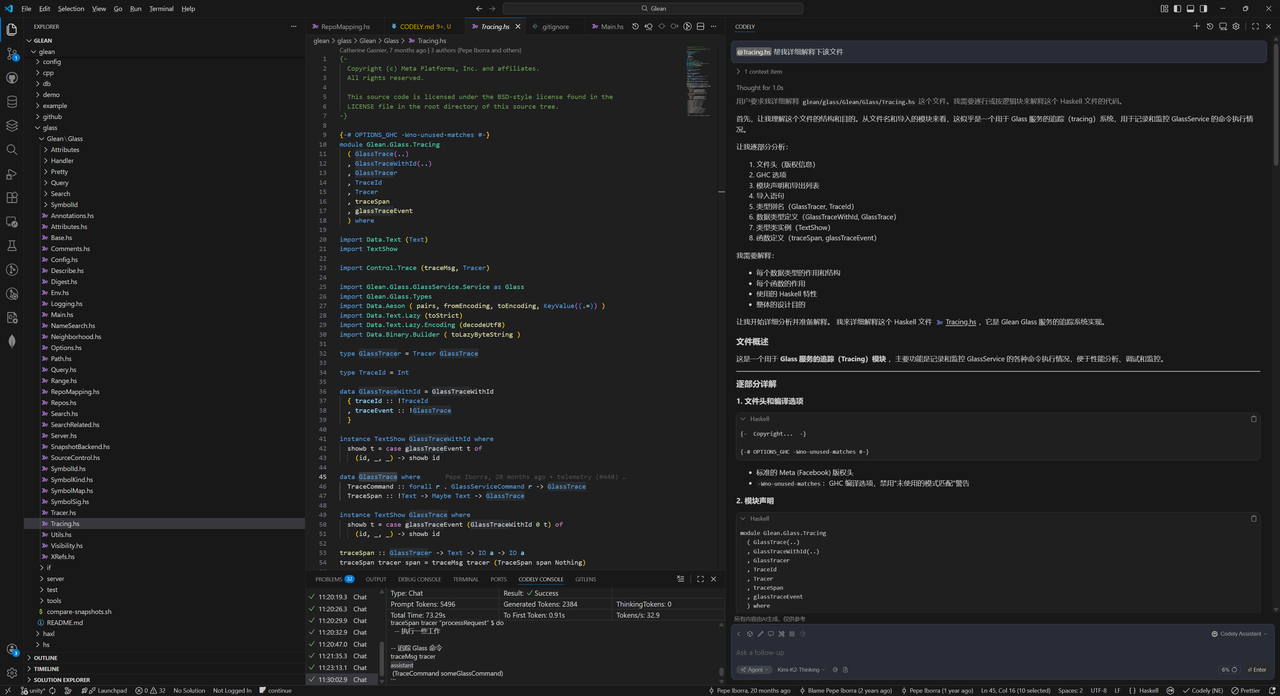
Method 1: Analyze Entire Code File
Search for the target code file using @filename, append the command Help me explain this file, and Tuanjie AI will analyze the file content line by line, providing detailed explanations of each function's functionality, parameter meanings, return value logic, and the overall purpose of the code.
Method 2: Analyze Specified Code Segment
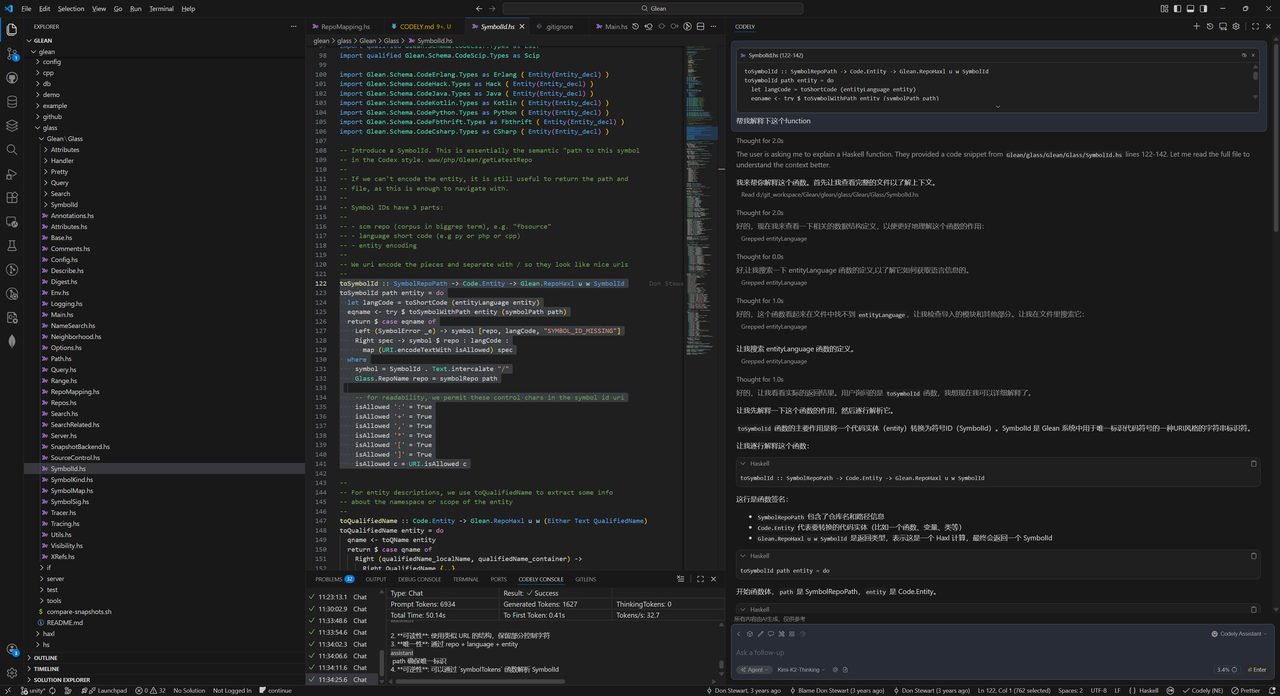
- Select the code block you want to analyze in the editor
- Press the shortcut key (VS Code: Cmd/Ctrl + L) to add the selected code to the Tuanjie AI conversation
- Enter a command (such as
Explain the logic of this code segment), and Tuanjie AI will focus on analyzing the business logic, implementation approach, and key details of the selected segment
Tip: For shortcut keys for Tuanjie AI plugins in other editors, please refer to the "Conversation Mode Shortcuts" section in the plugin documentation.
Method 3: Automatically Add Comments to Functions
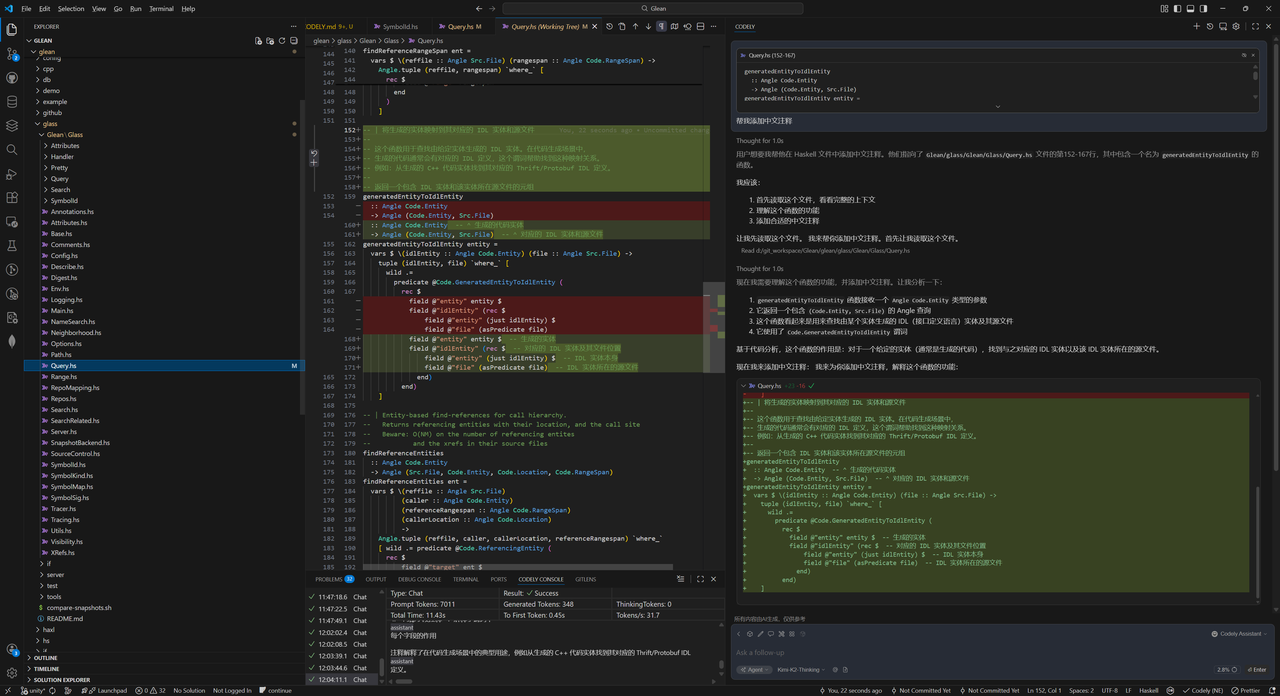
For functions without comments or with incomplete comments, you can quickly generate standard comments through Tuanjie AI:
- Select the target function and press the shortcut key to add the selected code to the Tuanjie AI conversation
- Enter a command (such as
Add detailed comments to this function) - Tuanjie AI will generate complete comments including functionality description, parameter explanation, return value explanation, and exception explanation according to industry-standard comment conventions (such as Javadoc, Haddock).
4. Summary
With Tuanjie AI, developers can break free from the inefficient pattern of traditional manual code reading. Through features such as project summary generation, entire file analysis, code segment analysis, and automatic comment addition, they can quickly establish overall understanding of unfamiliar projects and precisely understand code logic. Whether taking over large projects at tech companies or learning open source repositories, Tuanjie AI can become an efficient tool for improving code reading efficiency and accelerating project onboarding.