Tuanjie AI Cloud
[Coming Soon]
Overview
Tuanjie AI Cloud is the remote collaboration and cloud management platform for Tuanjie AI, allowing you to access and manage local workspaces through the cloud. With Remote Tunnel, you can access Tuanjie AI workspaces on your local computer from anywhere, enabling remote collaboration and flexible workflows.
Core Features
- Remote Access: Access local workspaces through the cloud
- Collaboration Management: Manage and view all connected workspaces in the cloud
- Secure Connection: Protect data transmission through secure tunnel connections
Usage Steps
1. Download Tuanjie Cowork
First, you need to install the Tuanjie Cowork client on your local computer.
- Visit the Tuanjie AI official website download page
- Download the corresponding Tuanjie Cowork installation package based on your operating system
- Follow the installation wizard to complete installation
2. Configure Remote Tunnel
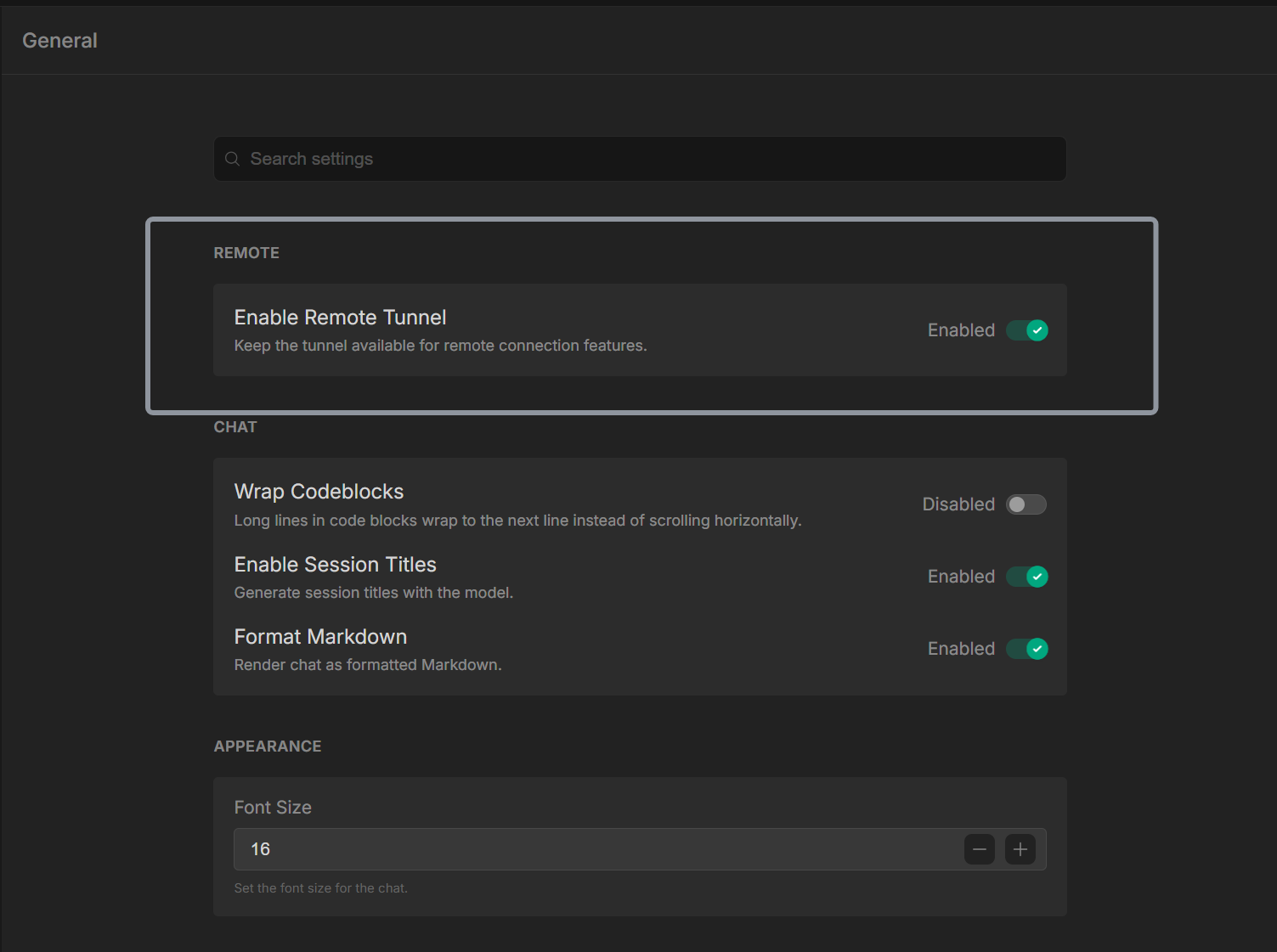
After installation, you need to enable the Remote Tunnel feature in Tuanjie Cowork.
- Open the Tuanjie Cowork application and log in with Unity ID
- Go to Settings - General page
- Find the Remote option
- Enable the Remote Tunnel feature
3. Access Tuanjie AI Cloud
After completing the local configuration, you can access your workspaces on Tuanjie AI Cloud.
- Visit the Tuanjie AI Cloud website
- Log in with the same Unity ID
- In the Cloud interface, you will see all local workspaces that have enabled Remote Tunnel
- Click on any workspace to start remote access and collaboration
FAQ
Q: Remote Tunnel cannot connect?
A: Check the following:
- Ensure your local computer is connected to the internet
- Check if firewall settings are blocking Tuanjie Cowork's network connections
- Try disabling and re-enabling the Remote Tunnel feature
- Confirm that your account permissions are sufficient
Q: Can't see my workspace on Cloud?
A: Confirm:
- Remote Tunnel in local Tuanjie Cowork is enabled
- The local workspace is opened in Tuanjie Cowork
- You have logged into Tuanjie AI Cloud with the same account
- Wait a few minutes for the workspace to sync to the cloud
Q: Remote access is very slow?
A: You can try:
- Check your local network connection quality
- Close other applications that are using bandwidth
- Try using in an environment with better network conditions
- Consider using local mode for development
Q: How to disconnect Remote Tunnel?
A: In Tuanjie Cowork settings:
- Find the Remote Tunnel option and disable the feature
- After confirming the operation, the workspace will no longer appear in Cloud
Best Practices
- Regular Sync: Keep local workspaces and Cloud synchronized to ensure data consistency
- Permission Management: Set workspace access permissions appropriately to protect sensitive information
- Network Optimization: Use Remote Tunnel in environments with good network conditions
- Security First: Do not enable remote access in insecure network environments
- Timely Updates: Keep Tuanjie Cowork and related components up to date