Tuanjie AI 助力快速掌握陌生项目
很多同学依靠背诵面试八股文成功入职大厂后,却在面对大型项目或陌生语言时陷入无从下手的困境。究其原因,是缺乏高效阅读和理解代码的实用方法。本文将详细介绍Tuanjie AI如何帮助开发者快速剖析陌生项目代码、高效上手新项目,并以 Meta 开源的 Glean 仓库为实操示例,带你沉浸式体验 Tuanjie AI 的核心功能。
一、前期准备:下载仓库与环境配置
克隆仓库到本地
使用 Git 命令将 Glean 仓库克隆到本地磁盘,便于后续通过 Tuanjie AI 进行分析:
git clone git@github.com:facebookincubator/Glean.git
克隆完成后,用你熟悉的编辑器打开仓库(本文以 VS Code 为例进行演示)。
安装 Tuanjie AI 插件并完成登录
请参考 Tuanjie AI 官方文档的安装和登录章节,完成插件的安装、激活以及账号登录操作,确保插件能正常调用功能。
二、初始化项目:生成项目全景总结
Tuanjie AI 提供了一键生成项目总结的功能,能快速梳理项目核心信息,为后续代码分析奠定基础。
操作步骤
点击 VS Code 中 Tuanjie AI 插件面板的「快速开始 - 生成项目总结」按钮,插件会自动扫描项目目录,分析项目的结构、编译方式、开发语言、核心框架等关键信息,并生成一份定制化的上下文文件Codely.md。
这份文件不仅能简化你向 Tuanjie AI 智能体提交项目专属指令的流程,还能让 AI 模型更深度地理解项目背景,以下是针对 Glean 生成的Codely.md核心内容:
# Glean - Code Understanding and Analysis System

## Project Overview

Glean is a system for collecting, deriving, and working with facts about source code. It's designed to efficiently store and query information about code structure at scale, powering tools from online IDE features to offline code analysis.

**Key Capabilities:**
- Collect and store detailed information about code structure
- Query code information to power development tools and analysis
- Support multiple programming languages through various indexers
- Provide language-agnostic symbol services via Glass

**Status:** Pre-release software from Meta (Facebook)

## Architecture Overview

### Core Components

```
                +----------+
                |          |
                |   lib    | Schema-specific libraries
                |          |
                +-----+----+
                      |
                +-----v----+
                |          |
                |  schema  | Generated schema support code
                |          |
                +-----+----+
                      |
                      |
                      |
                      |
                +-----v-----+                   +-----------------+
                |           | remote            |                 | Access
                | client/hs | client API        | client/hs/local | local DBs
                |           |                   |                 |
  +------+      +-----+-----+                   +--------+--------+
  |      |            |                                  |
  |  if  |            |                                  |
  |      |       +----v---+                         +----v---+
  +------+<------|        |                         |        |
                `|   hs   <--------------------------   db   |`
  +------+<------|        |                         |        |
  |      |       +----+---+                         +----|---+
  | util |            |                                  |
  |      |            |                                 |
  +------+            |                                  |
                      |                                  |         Haskell
            ----------+----------------------------------+-----------------
                      |                                  |           C++
                      |                                  |
                 +----v----+                        +----v----+
                 |         |                        |         |
               `|   rts   <------------------------+ rocksdb |`
                 |         |                        |         |
                 +---------+                        +---------+
```

### Directory Structure

- **rts/** - Glean Runtime System (C++)
  - Fact storage, serialization, ownership
  - Bytecode and query evaluation
  - Write cache

- **cpp/** - C++ API for Glean RTS (used by Clang indexer)

- **util/** - Haskell utilities (`Glean.Util.*`)

- **bytecode/** - Bytecode definitions and code generation

- **if/** - Thrift interface files

- **hs/** - Low-level Haskell layer
  - Angle language parser and types
  - Schema handling
  - Haskell API to RTS functionality
  - Bytecode generation

- **db/** - Database management and query engine
  - Database management (`Glean.Database.*`)
  - Query engine (`Glean.Query.*`)
  - Write processing (`Glean.Write.*`)
  - Generic Glean backend

- **rocksdb/** - C++ RocksDB storage layer

- **client/** - Client APIs for various languages

- **server/** - Glean server implementation

- **glass/** - Glass service (language-agnostic symbol server)
  - Provides IDE-like features: go-to-definition, find-references, symbol search
  - LSP-like API on top of Glean

- **index/** - Framework for specifying indexers

- **schema/** - Schema definitions and generated code

- **lang/** - Language-specific indexers

- **tools/** - CLI tools and utilities

- **test/** - Test suites and regression tests

## Language Support

### Fully Supported Languages
- **C++ and C** - via dedicated indexer
- **Hack** - via dedicated indexer
- **Haskell** - via dedicated indexer
- **JavaScript/Flow** - via dedicated indexer

### Via SCIP/LSIF Formats
- Rust (via rust-analyzer)
- Go
- TypeScript
- Java
- Python
- Dotnet

### Future Support (not in open source yet)
- Python (native indexer)
- Java (native indexer)
- Kotlin, Erlang, Thrift, Buck, Bazel, C#

## Build System

Glean uses a hybrid build system combining Cabal (Haskell) and Make (C++):

### Build Commands

```bash
# Build everything
make

# Build with development mode (faster, unoptimized)
make MODE=dev

# Build with optimized mode
make MODE=opt

# Run tests
make test

# Build specific components
make glean  # Builds glean, glean-server, glean-hyperlink
```

### Build Modes

- **Default mode**: Standard Cabal build
- **dev mode**: Fast, unoptimized builds for development
- **opt mode**: Slow, optimized builds for benchmarking

### C++ Library Building

C++ libraries can be built two ways:
- **Via Make** (default for development): Parallel compilation, automatic dependency tracking
- **Via Cabal**: Required for Hackage compatibility

### Build Configuration

The build system uses `glean.cabal.in` as a template, processed with m4 macros to generate `glean.cabal` based on build mode.

## Development Workflow

### Prerequisites

- GHC (Glasgow Haskell Compiler)
- Cabal 3.6+
- C++ compiler (Clang or GCC)
- RocksDB
- Thrift compiler

### Setting Up Development Environment

1. Install dependencies:
```bash
./install_deps.sh  # If available, or follow manual setup
```

2. Update Cabal:
```bash
make cabal-update
```

3. Build the project:
```bash
make MODE=dev  # For development
```

4. Run tests:
```bash
make test
```

### Code Style Guidelines

#### Haskell Style
- Use `hlint` for style checking (configuration in `.hlint.yaml`)
- 80 character line width
- Code should be `-Wall` clean
- **Key style preferences:**
  - Avoid point-free style excessively
  - Use explicit error messages instead of partial functions like `fromJust`
  - Prefer `foldl'` over `foldl` to avoid space leaks
  - Avoid overly clever code - clarity over conciseness

#### C++ Style
- Should compile with both Clang and GCC
- Follow Facebook C++ style guidelines

### Testing

- **Unit tests**: Located in `test/lib/` and `test/tests/`
- **Regression tests**: Located in `test/regression/`
- **Language-specific tests**: Located in `lang/` directories
- Run all tests: `make test`

## Key Tools and Services

### CLI Tools

- **glean** - Main CLI tool for interacting with Glean
- **glean-server** - Glean server for remote access
- **glean-hyperlink** - Hyperlinking service
- **glass** - Glass symbol server CLI

### Docker Support

```bash
# Demo with React codebase
docker run -ti -p8888:8888 ghcr.io/facebookincubator/glean/demo

# Demo with your own codebase
docker run -ti -p8888:8888 -v /your/code:/glean_demo/code ghcr.io/facebookincubator/glean/demo

# Interactive shell with Glean binaries
docker run -ti -p8888:8888 ghcr.io/facebookincubator/glean/demo shell
```

## Configuration

### Schema Management

Schemas define the structure of facts in Glean. Located in:
- `glean/schema/source/` - Schema source files
- `glean/schema/gen/` - Generated schema support code

### Glass Configuration

Glass service configuration for repository mappings is in:
- `glean/glass/Glean/Glass/RepoMapping.hs` - Repository and language mappings

## CI/CD

GitHub Actions workflows:
- **ci.yml** - Main CI pipeline
- **ci-aarch64.yml** - ARM64 testing
- **gh_pages.yml** - Documentation deployment
- **glean-docker.yml** - Docker image builds

## Common Development Tasks

### Adding a New Language Indexer

1. Create indexer in `glean/lang/`
2. Add schema definitions in `glean/schema/`
3. Add regression tests in `glean/lang/[language]/tests/`
4. Update Glass configuration if needed

### Modifying Schemas

1. Edit schema source in `glean/schema/source/`
2. Regenerate schema code: `make gen-schema`
3. Update dependent code and tests

### Working with Glass

1. Glass provides language-agnostic API in `glean/glass/`
2. Main service definition in `glean/glass/if/glass.thrift`
3. Repository mappings in `glean/glass/Glean/Glass/RepoMapping.hs`

## Documentation

- **Main docs**: https://glean.software/docs/introduction
- **Glass docs**: `glean/glass/README.md`
- **Roadmap**: `glean/ROADMAP.md`
- **Contributing**: `CONTRIBUTING.md`

## Getting Help

- **GitHub Issues**: https://github.com/facebookincubator/Glean/issues
- **Discord**: https://discord.gg/w3s6X6QAHZ
- **Documentation**: https://glean.software

## License

BSD-3-Clause (see LICENSE file)

## Contributing

See CONTRIBUTING.md for detailed guidelines. Key points:
- Sign the CLA before contributing
- Add tests for new functionality
- Ensure tests pass and code lints
- Follow style guidelines
- Update documentation for API changes
你也可以根据实际需求,手动修改Codely.md中的信息,补充项目细节或调整内容结构。
三、代码阅读:Tuanjie AI 核心功能实操
完成项目初始化后,即可通过 Tuanjie AI 的多种方式分析代码,快速理解文件、函数的逻辑与作用。
方式 1:解析整个代码文件
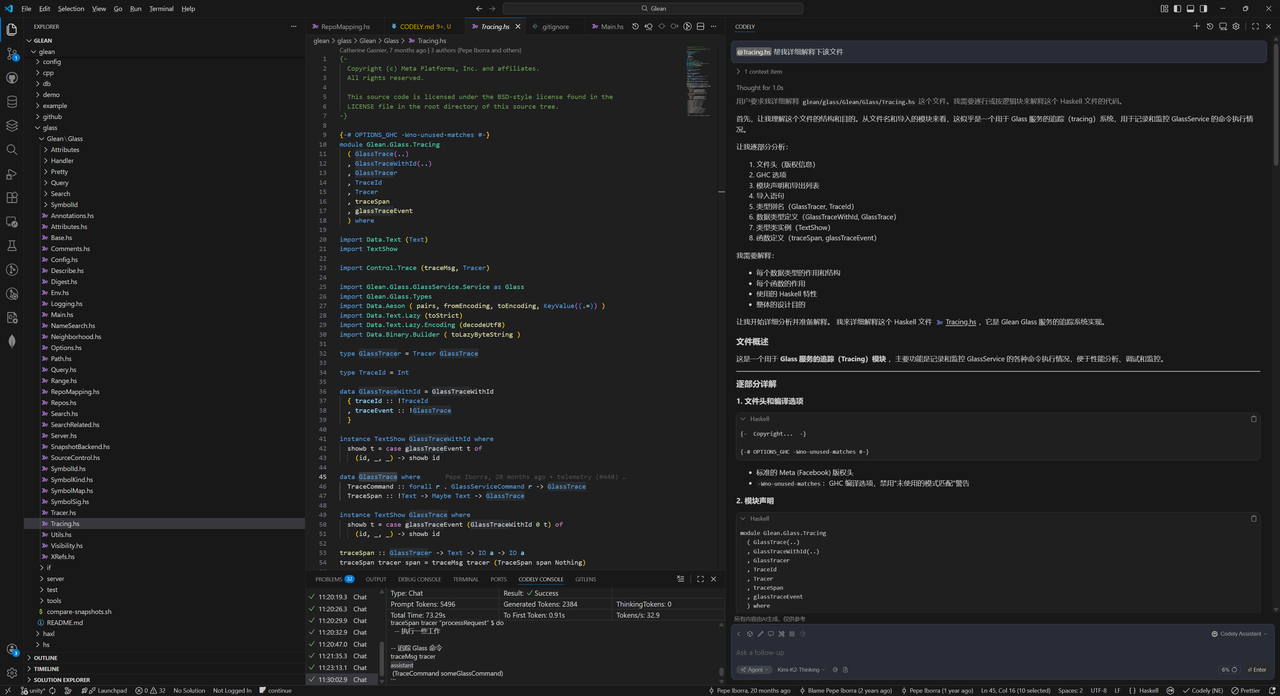
通过 @filename 搜索目标代码文件,拼接指令帮我解释下该文件,Tuanjie AI 会逐行分析文件内容,详细说明每个函数的功能、参数含义、返回值逻辑以及代码的整体作用。
方式 2:解析指定代码片段
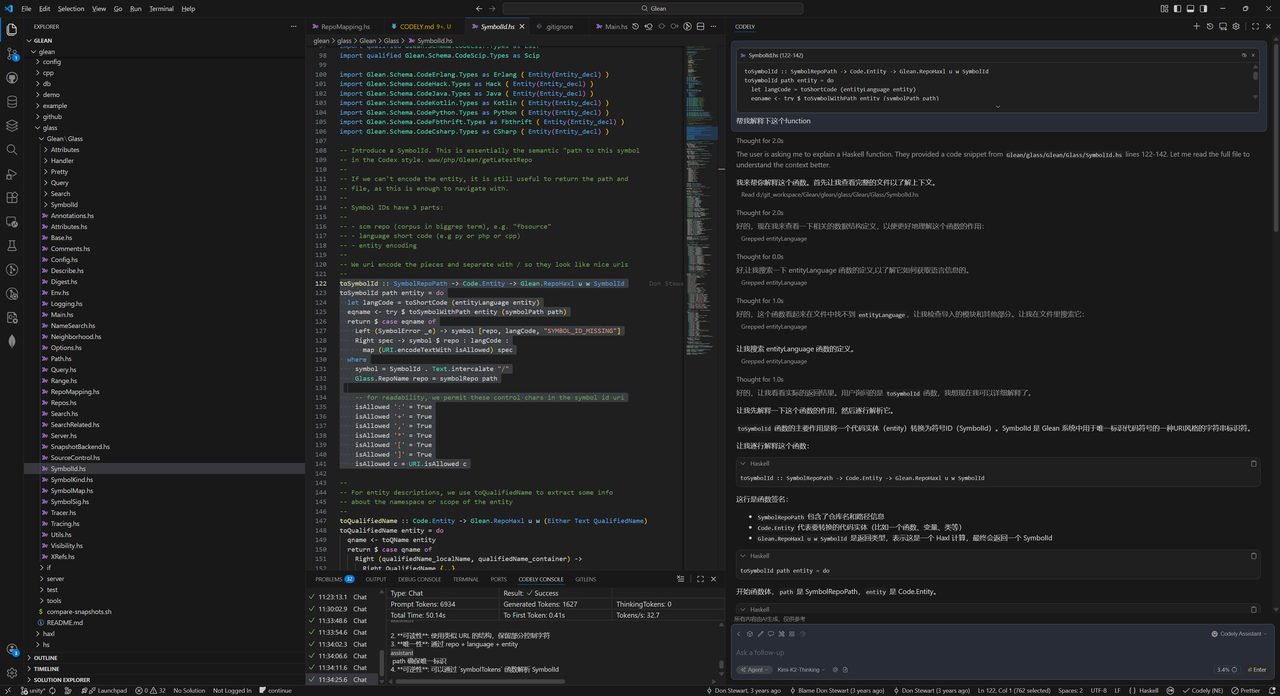
- 在编辑器中选中需要分析的代码块
- 按下快捷键(VS Code:Cmd/Ctrl + L),将选中的代码添加到 Tuanjie AI 会话中
- 输入指令(如
解释这段代码的逻辑),Tuanjie AI 会聚焦分析选中片段的业务逻辑、实现思路与关键细节
提示:其他编辑器的 Tuanjie AI 插件快捷方式可参考插件文档的「对话模式快捷键」章节。
方式 3:为函数自动添加注释
针对无注释或注释不全的函数,可通过 Tuanjie AI 快速生成规范注释:
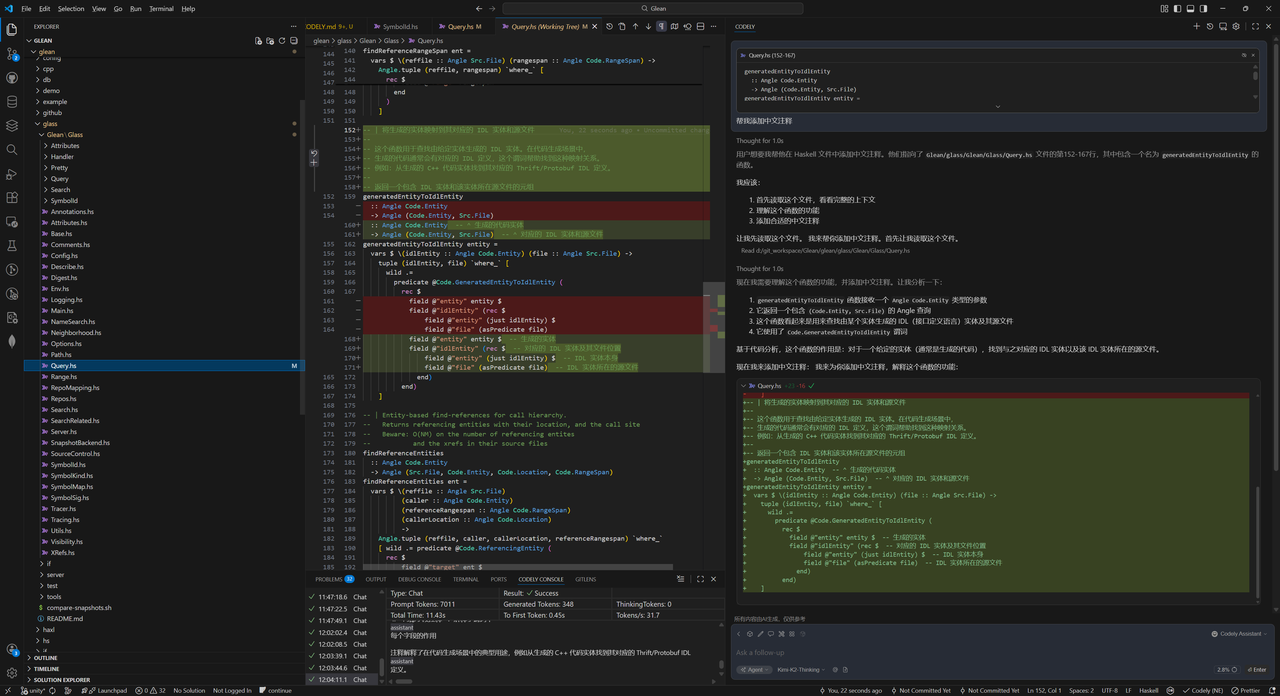
- 选中目标函数并按快捷键,将选中的代码加入的Tuanjie AI会话中
- 输入指令(如
为这个函数添加详细的注释) - Tuanjie AI 会按照行业通用的注释规范(如 Javadoc、Haddock),生成包含功能描述、参数说明、返回值解释、异常说明的完整注释。
四、总结
借助 Tuanjie AI,开发者可摆脱传统手动阅读代码的低效模式,通过项目总结生成、整文件解析、代码片段分析、自动加注释等功能,快速建立对陌生项目的整体认知,精准理解代码逻辑。无论是接手大厂大型项目,还是学习开源仓库,Tuanjie AI 都能成为提升代码阅读效率、加速项目上手的高效工具。